
Download PodcastGPT – AI‑Powered Podcast Summarization Tool
Overview
PodcastGPT is an innovative AI assistant that reshapes the way you consume audio content. By automatically identifying and extracting the most compelling highlights from any podcast episode, it saves you countless minutes that would otherwise be spent scrolling through long episode lists. The tool integrates seamlessly with your favorite podcast applications, whether you listen on a desktop, laptop, or mobile device.
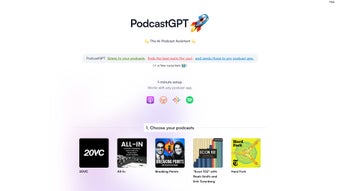
After a quick one‑minute setup, PodcastGPT begins analyzing the episodes you select, curating short, context‑rich segments that match your personal interests. You can further refine the output by chatting with an embedded chatbot, allowing you to specify topics, preferred speakers, or even the length of each highlight. Although PodcastGPT does not host audio files itself, it functions as a powerful middleware layer that enriches the listening experience without adding technical complexity.
Its focus on speed, accuracy, and user‑centric customization makes it an indispensable companion for podcast enthusiasts, busy professionals, and anyone who wants to stay informed while minimizing time spent on audio consumption. Whether you’re a commuter, a student, or a lifelong learner, PodcastGPT turns the sprawling world of podcasts into a concise, tailored feed that fits perfectly into your daily routine.
Key Features & Benefits
- AI‑Driven Highlight Extraction: Uses advanced natural language processing to pinpoint the most relevant moments in any episode.
- One‑Minute Setup: Simple onboarding that connects PodcastGPT to your existing podcast apps without manual configuration.
- Cross‑Platform Compatibility: Works with Windows, macOS, Android, and iOS podcast clients.
- Customizable Chatbot Interface: Allows you to set preferences for topics, speakers, and segment length.
- Seamless Delivery: Highlights are sent directly to the app you already use, eliminating the need for a separate player.
- Privacy‑First Architecture: PodcastGPT processes audio locally or via secure cloud endpoints, never storing your personal listening data.
- Regular Updates: Continuous model improvements keep the summarization accurate as new podcasts emerge.
- Lightweight Footprint: Minimal system resources, ensuring your device stays fast and responsive.
Installation, Usage & Compatibility
Step‑by‑Step Installation
Installing PodcastGPT is intentionally straightforward. First, visit the official download page and select the version that matches your operating system. For Windows and macOS, you’ll receive a standard installer (.exe or .dmg).
Mobile users can download the companion app from the Google Play Store or Apple App Store. Once the file is downloaded, launch the installer and follow the on‑screen prompts – the wizard will request permission to access your podcast library and to create a small background service that handles AI processing. After installation, open PodcastGPT and click “Connect My Podcast App.” A list of compatible apps (e.g., Apple Podcasts, Spotify, Pocket Casts, Google Podcasts) appears; choose your primary player and authenticate via OAuth if required.
The connection is secured with end‑to‑end encryption, ensuring that only you can trigger summarization requests.
How to Use PodcastGPT Effectively
Once connected, the workflow is intuitive. Navigate to the “Library” tab within PodcastGPT and select any episode you wish to summarize. Click “Generate Highlights,” and the AI begins analyzing the audio.
Within seconds to a couple of minutes (depending on episode length), a list of curated segments appears. Each segment includes a timestamp, a short textual description, and a “Play Highlight” button that launches the snippet in your chosen podcast app. If you want a deeper dive, click “Chat with Bot” to refine results – you can ask for more emphasis on specific guests, filter out advertising sections, or request longer excerpts.
The tool also supports batch processing: select multiple episodes, and PodcastGPT will produce a consolidated highlight reel that you can export as a playlist.
Supported Operating Systems
PodcastGPT is built to run on the most common platforms:
- Windows 10 and later (64‑bit)
- macOS 11 (Big Sur) and later
- Android 8.0 (Oreo) and newer
- iOS 13 and newer
The desktop versions leverage native APIs for low‑latency audio processing, while the mobile apps use optimized on‑device inference to protect user privacy. Regardless of the platform, the experience remains consistent: quick summarization, smooth integration with your existing podcast client, and a responsive chatbot that adapts to your feedback.
Pros, Cons & Frequently Asked Questions
Pros
- Fast, AI‑powered summarization that saves time.
- Simple one‑minute setup with minimal technical steps.
- Broad compatibility with major podcast apps on Windows, macOS, Android, and iOS.
- Customizable chatbot for personalized highlight preferences.
- Privacy‑focused design; no audio data is stored long‑term.
- Free core version with optional premium features.
Cons
- Premium features (e.g., longer highlight lengths) require a subscription.
- Performance may vary on older devices with limited processing power.
- Currently does not support live‑streamed podcasts; only recorded episodes.
FAQ
Is PodcastGPT free to use?
PodcastGPT offers a fully functional free tier that includes basic highlight generation and chatbot interaction. Advanced options such as extended highlight duration, batch processing for large libraries, and priority AI updates are available through a modest monthly subscription.
Can I use PodcastGPT with any podcast app?
The tool supports the most popular podcast clients, including Apple Podcasts, Spotify, Pocket Casts, Google Podcasts, and Overcast. If your preferred app isn’t listed, you can still use the generated highlight URLs manually or request support via the in‑app feedback form.
How does PodcastGPT protect my privacy?
All audio analysis is performed either locally on your device or through encrypted cloud endpoints that do not retain the original file. Only the derived text metadata (timestamps and short summaries) is temporarily stored to facilitate playback, and it is automatically deleted after the session ends.
What internet connection is required?
A stable broadband or 4G/5G connection is recommended for the cloud‑based summarization mode, which provides the most up‑to‑date language models. If you enable the “offline mode” on supported devices, the AI runs locally, and only a one‑time download of the model is needed.
Can I export the highlights as a playlist?
Yes. After generating highlights, you can click “Export Playlist,” which creates an M3U file compatible with most podcast apps and media players. The playlist contains direct links to each highlighted segment, making it easy to share or archive.
Conclusion & Call to Action
PodcastGPT bridges the gap between the ever‑expanding universe of podcasts and the limited time we all have. By delivering AI‑curated highlights directly to the apps you already love, it transforms passive listening into an active, efficient learning experience. The combination of rapid setup, cross‑platform support, and a conversational chatbot makes it both powerful for power users and approachable for newcomers. Whether you’re a commuter looking to skim the day’s news, a researcher extracting expert insights, or simply someone who wants to stay entertained without the overwhelm, PodcastGPT offers a free, secure, and continuously improving solution.
Ready to reclaim hours of listening time? Download PodcastGPT now and start receiving personalized podcast highlights today. Join the growing community of listeners who are already enjoying smarter, faster, and more enjoyable podcast experiences.



.png)



